


After serving us well for going on 8 years, we've decided to move our blog from Blogger over to our new custom publishing platform.
You can get up to date information at: www.smartboxwebmarketing.com/googlegenius.htm
Or use our shortcut domain www.googlegeni.us
SEO for Dentists
Lots of guys will tell you about what they're going to do, or how they're going to do it, or what they could do.
Not to sound cocky, but we prefer just to do it (and then show you what it looks like).
Here's two of of our clients with live results from Google showing their rankings:
We'll be rolling out more case studies in the coming weeks to our website from other clients, stay tuned.
Considering the facts:
Not to sound cocky, but we prefer just to do it (and then show you what it looks like).
Here's two of of our clients with live results from Google showing their rankings:
Dr. Ron Receveur - Louisville Implant Dentist Dominates Google
Dr. James McAnally - Seattle Big Case Dentist Tops The Rankings
Dr. James McAnally - Seattle Big Case Dentist Tops The Rankings
We'll be rolling out more case studies in the coming weeks to our website from other clients, stay tuned.
Considering the facts:
- 97% of consumers use online media to research products and services in their local area
- According to Google 90% of searchers won’t look past page one of the results page
- 86% of U.S. households now use the Internet as an information source when shopping locally
- 85% of local searchers will follow up with a phone call or visit to the listing that stands out best
- 84% of all searches on the internet are routed through Google
AOL Extends Google Search Deal +5 Years
AOL announced they have extended their search deal with Google for an additional five-years. This includes Google powering AOL’s organic and paid search results. The deal also added in that Google will power search on mobile search, in mobile apps and content. Also, all of AOL’s video content will also be on YouTube as part of this new extended deal.
In summary, the new five year deal includes:
In summary, the new five year deal includes:
- Search Products: Google will provide AOL with additional features and enhancement to its leading Web search products that will improve the consumer search experience across AOL’s network of sites.
- Advertising Products: Google will provide AOL with best-in-class ad formats, giving AOL consumers a better, more relevant ad experience.
- Mobile Search: As AOL renews its focus on mobile apps and content, the companies will work together to expand the alliance to cover mobile search.
- YouTube: AOL and YouTube have agreed to a content partnership that will bring AOL’s video content to YouTube. Global Focus: The alliance is international in scope and will provide improved experiences to AOL’s worldwide audience.
Today is another important step in the turnaround of AOL. AOL users will be getting a better search and search ads experience from the best search company in the world – Google. After nearly a decade-long partnership in search, we’re looking forward to expanding our global relationship to mobile search and YouTube. All aspects of our partnership will be improved by this deal.Eric Schmidt, Chairman and Chief Executive Officer of Google said:
We’re excited to deepen our partnership. This agreement combines Google’s expertise in search and advertising with AOL’s strength in online content. It’s particularly exciting to see our relationship expand into video and mobile. These areas are now at the heart of users’ online experiences and at the core of both of our businesses.
Professionals, amateurs and the great unwashed
If you want something done, perhaps you would ask a professional to do it. Someone who costs a lot but is worth more than they charge. Someone who shows up even when she doesn't feel like it. Someone who stands behind her work, gets better over time and is quite serious indeed about the transaction.
Or perhaps you could hire a passionate amateur. That's a forum leader doing it for love, not money. An obsessive in love with the craft. A talented person willing to trade income for the chance to do what he loves, with freedom.
Please, though, don't hire someone who just thinks it's a job. This category represents the majority of your options, and this category is what gives work a bad name.
-Seth Godin
Re-Targeting Advertisments
The New York Times is reporting on a new kind of web ad that takes products you were looking at purchasing on one site and continually advertises them in front of you at subsequent sites. After looking at shoes at Zappos, a mother in Montreal noticed the shoes followed her: 'For days or weeks, every site I went to seemed to be showing me ads for those shoes. It is a pretty clever marketing tool. But it's a little creepy, especially if you don't know what's going on.' The spreading ploy is called 'retargeting ads' and really are just a good demonstration of how an old technology (all they use are leftover browser cookies) are truly invasive and privacy violating. Opponents are clamoring for government regulation to protect the consumer and one writer mentioned a consumer 'do not track' list — adding that retailers really show little fear of turning off customers with their invasion.
Yahoo’s Results Now Come From Bing
Yahoo just announced the transition from Yahoo Search powered results to Bing powered organic Yahoo search results is now complete. The search ads are still from Yahoo but the free, organic results are now powered by Bing in the U.S. and Canada.
Shashi Seth, Senior Vice President of Yahoo! Search Products, said ” I am proud to announce that the transition of organic search between Yahoo! and Microsoft is complete.” He then told everyone to check out the Bing blog to see what they had to say.
Bing said:
The full transition began about a week ago and is fully live now.
You can confirm this yourself by conducing a search at Yahoo and scrolling to the bottom of the page. At the bottom, there should be a “Powered by Bing” line in really small font:
Ahh but not so fast. What does this really mean to you?
5% LESS organic traffic from Bing + Yahoo to your website. This means Google will continue to dominate the market with near 80-90% market share for the foreseeable future..
Shashi Seth, Senior Vice President of Yahoo! Search Products, said ” I am proud to announce that the transition of organic search between Yahoo! and Microsoft is complete.” He then told everyone to check out the Bing blog to see what they had to say.
Bing said:
Today I am happy to share that Bing is powering Yahoo!’s search results in the US and Canada (English only for now, the other languages will come in the weeks and months ahead).
So what’s next? We continue to work hard on the migration to adCenter, and are optimistic about completing this phase later this fall. As we have said all along, our primary goal is to provide advertisers with a quality transition experience in 2010, while being mindful of the holiday season.
This is a great milestone for Bing and Yahoo! and our customers, and we are happy to report the transition has gone smoothly and we feel great about the progress our search alliance has been making over the summer.Shashi Seth of Yahoo also added, “we are also working hard on finalizing our revenue model for the Yahoo! Search BOSS program going forward, and will be offering other search-related tools for publishers in the months to come.”
The full transition began about a week ago and is fully live now.
You can confirm this yourself by conducing a search at Yahoo and scrolling to the bottom of the page. At the bottom, there should be a “Powered by Bing” line in really small font:
Ahh but not so fast. What does this really mean to you?
5% LESS organic traffic from Bing + Yahoo to your website. This means Google will continue to dominate the market with near 80-90% market share for the foreseeable future..
Eye Tracking Study Shows Importance Of Search Snippets
A new eye tracking study done in Spanish by Mari-Carmen Marcos and Cristina González-Caro at Pompeu Fabra University in Barcelona and published July 2010 (Spanish PDF over here) was translated by Ani López reveals some new insights into searcher behavior.
The study shows that the search snippet, often the meta description from the site, is an extremely important factor for searchers. The study included 58 people of both genders and wide age range and tested informational, navigational, transactional and multimedia types of searches. The searches were done on Google, Google Images, Yahoo and Yahoo Images with a total of 22 tasks per person.
Here is the outcome of the study:

As you can see, the snippet is fixated over more than the title or the URL. Meaning the searchers spent more time looking at the snippet than the title or URL of the search result. This may imply that having a nice snippet, which is sometimes pulled from your meta description, is critical in increasing the chances of someone clicking on your search listing, instead of your competitors.
The study shows that the search snippet, often the meta description from the site, is an extremely important factor for searchers. The study included 58 people of both genders and wide age range and tested informational, navigational, transactional and multimedia types of searches. The searches were done on Google, Google Images, Yahoo and Yahoo Images with a total of 22 tasks per person.
Here is the outcome of the study:

As you can see, the snippet is fixated over more than the title or the URL. Meaning the searchers spent more time looking at the snippet than the title or URL of the search result. This may imply that having a nice snippet, which is sometimes pulled from your meta description, is critical in increasing the chances of someone clicking on your search listing, instead of your competitors.
Google Doubles Pace Of Acquisitions In 2010
Google’s CEO Eric Schmidt said he has doubled that pace because “the opportunities are there.” Schmidt added, “We can afford it. We’re in a mode of investment for the long term.” Just this year, Google has acquired 17 companies including Aardvark, reMail, Picnik, DocVerse, Simplify Media, Episodic, PlinkArt, Agnilux, LabPixies, Bump Technologies, Global IP Solutions, Simplify Media, Invite Media, ITA Software, Metaweb, Instantiations, Slide.com and Jambool.
Google Updating Search Results As You Type
Rob Ousbey documented on video how Google is testing a feature where the search results on the page are updating as you type your search query. This is a form of search query refinement and Google Suggest that dynamically modifies the search results on the page as you type.
Official: Google Now Lets One Domain Dominate Search Results
Prior to this week, Google would only show up to two results from the same domain on a single search result page. Now, Google has confirmed what many are seeing, where a single brand dominates a single page of Google’s search results.
This is not a bug, this is not an anomaly, it is an intentional change to Google’s ranking algorithm. Google said:
Today we’ve launched a change to our ranking algorithm that will make it much easier for users to find a large number of results from a single site. For queries that indicate a strong user interest in a particular domain.
What I find interesting is the last statement by Google:
We expect today’s improvement will help users find deeper results from a single site, while still providing diversity on the results page.
Remember, Google’s Peter Norvig who said, “for the second one [search result], you don’t want something that’s almost the same as the first. You prefer some diversity, so there’s where minority views start coming in.” You prefer diversity. Google is clearly saying that a result from the same site can still be diverse and different enough, even if there are ten results, all from the same site.
On the reputation management front, this is a clear winner for those with reputation management issues.
This is not a bug, this is not an anomaly, it is an intentional change to Google’s ranking algorithm. Google said:
Today we’ve launched a change to our ranking algorithm that will make it much easier for users to find a large number of results from a single site. For queries that indicate a strong user interest in a particular domain.
What I find interesting is the last statement by Google:
We expect today’s improvement will help users find deeper results from a single site, while still providing diversity on the results page.
Remember, Google’s Peter Norvig who said, “for the second one [search result], you don’t want something that’s almost the same as the first. You prefer some diversity, so there’s where minority views start coming in.” You prefer diversity. Google is clearly saying that a result from the same site can still be diverse and different enough, even if there are ten results, all from the same site.
On the reputation management front, this is a clear winner for those with reputation management issues.

Use Infusionsoft? Checkout our One Click Opt-In Script!
We're finishing up developing this for our business, and I'll be making it available to the Infusionsoft community. It's actually live on our website right now in final testing.
-Colin Receveur
Data use on cell phones up 50%
For the first time, the majority of cellphone users access data services. That’s driven a 50 percent increase in the average data use across all users.
A forthcoming study by Validas shows 53 percent of all cellphone subscribers are data users, up from 42 percent last year. The average data usage per subscriber is not 145.8MB a month compared with 96.8MB a month last year. Most of that is simply the result of more data users, though it does suggest those with data capabilities are using slightly more each month.
There’s a lot of attention paid to AT&T’s iPhone data plans, particularly the withdrawal of unlimited plans, but it turns out that the device doesn’t rack up the most data use on average. Instead Verizon’s users have the higher average data use. The study shows the average Verizon smartphone owner uses 428MB a month, compared with 338MB for the iPhone.
Google Mobile Search Market Share Near 100%
Let’s be cautious about running too far with these numbers, but Royal Pingdom (using data from StatCounter) has reported/estimated Google’s global mobile search market share to be almost 100%.

Google is clearly dominant in mobile search across smartphones (and feature phones). However these numbers may not be completely accurate. For example, the chart above shows PC and mobile search market share according to StatCounter. But while the general PC search share numbers may reflect selected markets (e.g., UK) they’re not accurate for the US and a number of other places around the world.
I’ve conducted mobile user surveys and seen plenty of third party data over the past two years that suggests the case isn’t quite this lopsided. At least a year ago mobile search market share was tracking the desktop generally though was somewhat more skewed in Google’s favor.
It’s quite possible that Google’s lead has accelerated — especially as Android devices have sold better and better — but I’m somewhat skeptical it’s this extreme. And Google itself doesn’t want this sort of a lopsided market because it will lend fuel to the anti-Google “monopoly” arguments gaining some momentum in pockets around the globe.
Separately the WSJ reported that Google CEO Eric Schmidt said Android could become a $10 billion market for Google annually:
“If we have a billion people using Android, you think we can’t make money from that?” Schmidt asked rhetorically. All it would take, he said, is $10 per user per year. Among other things, Google might earn such sums from selling access to digital content from newspapers.
YouTube Increasing Upload Limit from 10 to 15 Minutes
Since YouTube's launch, the longest video you could upload was 10 minutes. No longer! Google reports that in the near future, that limit will rise to 15 minutes.
UK Government departments spend £6m on search engines
Four government departments spent almost £6m ensuring their websites appeared on search engine results pages in the last two financial years, according to newly released figures.
The Department of Health was the biggest spender, running up a bill of £4.4m in "paid search" fees.
It said the money was spent supporting campaigns on smoking and the flu pandemic.
Organisations can pay search engines to ensure their websites appear at the top of users' searches. They are often charged for each person who accesses their sites via the link.
The Department for Communities and Local Government spent over £750,000 promoting campaign websites including those for Home Information Packs, Eco Towns and Energy Performance Certificates.
The Department of Energy and Climate Change spent more than £309,000 last year. The Department of the environment, food and rural affairs (Defra) spent almost £500,000.
The Department of Health was the biggest spender, running up a bill of £4.4m in "paid search" fees.
It said the money was spent supporting campaigns on smoking and the flu pandemic.
Organisations can pay search engines to ensure their websites appear at the top of users' searches. They are often charged for each person who accesses their sites via the link.
The Department for Communities and Local Government spent over £750,000 promoting campaign websites including those for Home Information Packs, Eco Towns and Energy Performance Certificates.
The Department of Energy and Climate Change spent more than £309,000 last year. The Department of the environment, food and rural affairs (Defra) spent almost £500,000.
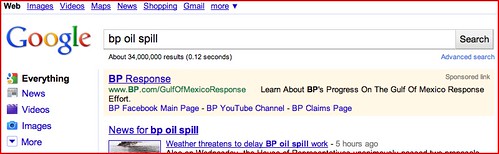
Goodbye Yellow Google AdWords Background & Hello Purple Backgrounds
Google has begun rolling out a new background color for the AdWords listings on Google’s search results. The new color is a pale purple, as opposed to the current pale yellow. Google has been testing the pale purple since May of this year and last week we have seen it ramp up in the number of people seeing it.
The RKG Blog has a comment from Google, which Google confirmed to us, that Google is indeed replacing the yellow with the purple background color. More and more users will see the new purple color and by the end of this week, all Google search properties should see the change.
About three years ago, Google switched from blue to the yellow background colors, with a change to how on-click events occur. You can see a picture of the old blue background colorsover here.
Here is Google’s official statement:
Starting today and ramping up to 100% globally by the end of this week, we’ll be changing the background color for ads that appear above the search results on Google.com as well as our local domains. The ads, which currently have a pale yellow background, will change to have a pale purple background. This change is part of the ‘look and feel’ update to our color palette and logo that we made back in May of this year to keep the Google results page looking fresh and modern. This is purely an aesthetic change to our ads and won’t have any impact on the way we target or serve advertisements on Google.com.
Here are pictures:

Write Your First Email Line Like a Tweet to Grab Interest

It's a tip offered up by web PR consultant Steve Rubel, who notes that an eBook author reached through his own crowded inbox and managed to get a click-through with a first line that grabbed him. Rubel dubs it "Tweetifying" of your email's lead sentence, but it's actually about half a 140-character tweet. The idea is the same, though—let the character limit guide you to a punchier first impression.
Facebook claims half a billion members
The popular social networking site known as Facebook has achieved yet another significant milestone: 500 million members.
An obviously pleased Mark Zuckerberg celebrated the occasion by launching a new applicationdubbed "Stories," which allows users to share their Facebook related tales and read hundreds of others.
 "Our mission is to help make the world more open and connected. Stories or examples of that mission and are both humbling and inspiring," the young CEO wrote in a blog post commemorating the momentous event.
"I could have never imagined all of the ways people would use Facebook when we were getting started 6 years ago."
So what is next for Facebook? Will the site be able to claim the unimaginable figure of 1 billion users within the next few years?
Well, Bob Metcalfe, co-inventor of Ethernet and founder of 3Com, told Mercury News that FB's continued success could result in a "New Web Order" which may eventually threaten Google.
"Do you think it's easier for Google to add social or Facebook to add search? My answer is that it's easier for Facebook to do search. I'm very optimistic about Facebook...So, Google, look out," said Metcalfe.
"Now, you would expect the exponential growth to turn into an S-curve as it caps out. But...even it falls short of a billion, it figures to maintain an orbit at lofty altitude. The network effects and prospects of user engagement will continue to grow, as individuals make more connections to other people or games, businesses and causes."
Jeremiah Owyang, a social media consultant with Altimeter Group, expressed similar sentiments.
"They've still got a ways to go before they reach saturation...Facebook's potential market size is as large as the online communication market itself."
An obviously pleased Mark Zuckerberg celebrated the occasion by launching a new applicationdubbed "Stories," which allows users to share their Facebook related tales and read hundreds of others.
"I could have never imagined all of the ways people would use Facebook when we were getting started 6 years ago."
So what is next for Facebook? Will the site be able to claim the unimaginable figure of 1 billion users within the next few years?
Well, Bob Metcalfe, co-inventor of Ethernet and founder of 3Com, told Mercury News that FB's continued success could result in a "New Web Order" which may eventually threaten Google.
"Do you think it's easier for Google to add social or Facebook to add search? My answer is that it's easier for Facebook to do search. I'm very optimistic about Facebook...So, Google, look out," said Metcalfe.
"Now, you would expect the exponential growth to turn into an S-curve as it caps out. But...even it falls short of a billion, it figures to maintain an orbit at lofty altitude. The network effects and prospects of user engagement will continue to grow, as individuals make more connections to other people or games, businesses and causes."
Jeremiah Owyang, a social media consultant with Altimeter Group, expressed similar sentiments.
"They've still got a ways to go before they reach saturation...Facebook's potential market size is as large as the online communication market itself."
Google Maps Adds Built-In URL Shortening
Sending someone a Google Maps URL can be a pain, because they tend to be very long. To remedy this, Google has integrated their previously mentioned goo.gl URL shortening service into Google Maps, so you can shorten links right from the map.
The feature is still in Google Labs, so you'll need to turn it on by clicking the green flask in the top right corner of the Maps page and enabling the "Short URL" feature. After refreshing the page, clicking on the "link" button will no longer give you a mile-long URL, but a concise link that you can paste into Twitter or send in an email. It does disable the embedding feature, but if you don't tend to use that anyway, it's a pretty handy little feature for figuring out those last few summer vacations.

The feature is still in Google Labs, so you'll need to turn it on by clicking the green flask in the top right corner of the Maps page and enabling the "Short URL" feature. After refreshing the page, clicking on the "link" button will no longer give you a mile-long URL, but a concise link that you can paste into Twitter or send in an email. It does disable the embedding feature, but if you don't tend to use that anyway, it's a pretty handy little feature for figuring out those last few summer vacations.
Google May Use Mouse Movements to Influence Search Rankings
How Google decides what sites come up first on any given search is a closely-guarded secret, a formula that changes regularly to keep people from gaming the system. But it may get a lot harder to predict.
A new patent filed by Google on Tuesday would allow Google to analyze information about where on a page users hover their mouse cursor, presumably showing the search giant what people were sort of interested in by didn't actually click through on.
It's a crazy idea, one that may have some merit. But then again, it may not. If you're doing any typing, for example, the chances are good that your cursor is just left in some random spot on your screen. Does that really mean anything? If anyone can derive some usable info from what is sure to be an insane glut of data, it's Google.
A new patent filed by Google on Tuesday would allow Google to analyze information about where on a page users hover their mouse cursor, presumably showing the search giant what people were sort of interested in by didn't actually click through on.
It's a crazy idea, one that may have some merit. But then again, it may not. If you're doing any typing, for example, the chances are good that your cursor is just left in some random spot on your screen. Does that really mean anything? If anyone can derive some usable info from what is sure to be an insane glut of data, it's Google.
NYC's Sexiest Billboard Doesn't Care For Dumphones

See that beautiful model there, frolicking with a few of her friends? No? Well, your smartphone can. This billboard—and two others like it—is one giant QR code that in this case gives particular significance to augmented reality.
Calvin Klein has occupied that particular billboard space, over a prominent corner on Houston Street, for quite some time. But whereas before it might have looked like below.

QR codes have been hugely popular in Japan, but haven't caught on in the US yet other than as a means to link apps in the Android Market. But Calvin Klein and augmented reality enthusiasts are both hoping the same maxim holds true: sex sells.
Add "Scam" to Your Searches When Checking out a Business, Product, or Web Site
People often turn to services like Yelp or Amazon to see what people think about a business, product, or web site, but to cut straight to complaints that may not have made it everywhere, reader MrYdobon adds one word to his searches.
Google is part of our digital brains, and we trust that part to know when something is a scam. Google bill gates email, and you'll find links to Urban Legends and Snopes at the top. Google kevin trudeau, and you only need to look a few links down before you unearth the controversy surrounding him. But googling only keywords won't help when a scam is new or knowledge about it isn't widespread.
Instead, I search my keywords plus the word "scam". For example, search "some business name" (with quotes), and you'll primarily find pages hosted by the business. However, if you Google "some business name" scam (with quotes), you'll find—in addition to this comment—information you would want to consider before doing business with that business (info Gawker readers are well familiar with).
Note: Just because you get hits when googling keyword + scam, doesn't mean the controversy you find is valid. Google won't rate the quality of the information you're reading for you. You still have to do that yourself.
Disclaimer: I make no claim that Kevin Trudeau or the Bill Gates Email are actual scams or scam artists. Rather, this post is using these as examples in which a Google search can produce pages with controversial information about them.
Google is part of our digital brains, and we trust that part to know when something is a scam. Google bill gates email, and you'll find links to Urban Legends and Snopes at the top. Google kevin trudeau, and you only need to look a few links down before you unearth the controversy surrounding him. But googling only keywords won't help when a scam is new or knowledge about it isn't widespread.
Instead, I search my keywords plus the word "scam". For example, search "some business name" (with quotes), and you'll primarily find pages hosted by the business. However, if you Google "some business name" scam (with quotes), you'll find—in addition to this comment—information you would want to consider before doing business with that business (info Gawker readers are well familiar with).
Note: Just because you get hits when googling keyword + scam, doesn't mean the controversy you find is valid. Google won't rate the quality of the information you're reading for you. You still have to do that yourself.
Disclaimer: I make no claim that Kevin Trudeau or the Bill Gates Email are actual scams or scam artists. Rather, this post is using these as examples in which a Google search can produce pages with controversial information about them.
Google Tags - "Highlighting" Your Business
Local customers already search Google for the products and services you offer. By creating a free business listing, you can make sure they can find you. When you add a tag to your listing, you can highlight what you most want your customers to see.
For example, you can add a coupon for new customers, highlight a video overview of your store, or even link to your menu. You decide what what's most important about your business and make sure it stands out.
Signing up and selecting your tag takes less than 5 minutes. All you need is a verified business listing and a valid credit card -- just visit your Google Places Dashboard and look for the link to enhance your listing.
- You can easily and inexpensively highlight your listing on Google from Google Places.
- Potential customers in your local area will see what you think is most important or unique about your business.
- You can track the effectiveness of your tag with your Google Places dashboard.
- You will be charged a low $25 flat monthly fee, with no bids and no keywords required.
- There is no additional work or ongoing management needed.
I'm on the Map, are You?
This unique bar code on the lower right of the sticker (known as a QR code) lets customers - and potential customers - instantly learn more about a business, by visiting a mobile version of the business' Place Page on any supported phone. Here's more on how it works and what you can do with it:
- When you see a QR code, use your phone's application to scan it. If you're scanning a QR code on one of the window decals that Google has sent to thousands of U.S. businesses, you'll quickly be taken to that business' mobile Place Page on Google, where you can:
- Read reviews to see what other users think about the business
- Find a coupon that the business has posted to their Place Page
- Star the business to remember to check it out later, or to remember to visit again
- Leave a review right after you leave the business. What's a better time to write what you think, than when you've just visited?

The Importance of Copywriting in Web Design
As designers, we rightfully spend our time focused on aesthetics. We are pixel pushers who firmly believe with the strongest conviction that attractive websites are fundamentally better websites.
We build our mockups with “lorem ipsum” so we can go back and write something better when we have the time. Deadlines approach and still we put off the text until the last possible second. Finally, as our various GTD apps inform us that the time has come to submit the artwork, we hash out some quick text to throw onto our beautiful creations and send them off, without a visual blemish yet still marred by the subpar copy that appears on every page.
For many of us, this is simply how we’re programmed. We’re visual beasts that thrive on good design. The problem of course is that the neglect of solid copy will often cause the finished product to suffer as much or more than a poor design. Unless designers are your target market, your user base will be populated largely by individuals that don’t speak design. Show them Dribbble.com and they’ll wonder aloud why anyone would ever create such a service.
Sure, they can often interpret what is ugly and what isn’t similarly to how we can, but only on an intuitive level. What they really notice is how the website feels. Whether it’s smooth or clunky, easy to navigate or impossible. This is what is meant when designers say that great design is transparent. If your users notice your interface too much, it’s probably because they hate it.
This same metaphor of transparency applies to copywriting on the web. It’s worth noting that the average user is in fact trained in reading and writing far more than design, though still only as much as a standard education supplies. To these users, we’ll call them “normal people” as opposed to we visual freaks, browsing the web is a reading experience. Evaluating a service involves skimming the sales pitch and reading the list of features as much or more than evaluating the visual layout of the elements on the page. They’ll even hire a designer based as much on what he says about himself as what appears in his portfolio. If you have strong copy, they won’t notice or evaluate it too much, they’ll be far too busy being convinced of what it’s saying.
We build our mockups with “lorem ipsum” so we can go back and write something better when we have the time. Deadlines approach and still we put off the text until the last possible second. Finally, as our various GTD apps inform us that the time has come to submit the artwork, we hash out some quick text to throw onto our beautiful creations and send them off, without a visual blemish yet still marred by the subpar copy that appears on every page.
For many of us, this is simply how we’re programmed. We’re visual beasts that thrive on good design. The problem of course is that the neglect of solid copy will often cause the finished product to suffer as much or more than a poor design. Unless designers are your target market, your user base will be populated largely by individuals that don’t speak design. Show them Dribbble.com and they’ll wonder aloud why anyone would ever create such a service.
Sure, they can often interpret what is ugly and what isn’t similarly to how we can, but only on an intuitive level. What they really notice is how the website feels. Whether it’s smooth or clunky, easy to navigate or impossible. This is what is meant when designers say that great design is transparent. If your users notice your interface too much, it’s probably because they hate it.
This same metaphor of transparency applies to copywriting on the web. It’s worth noting that the average user is in fact trained in reading and writing far more than design, though still only as much as a standard education supplies. To these users, we’ll call them “normal people” as opposed to we visual freaks, browsing the web is a reading experience. Evaluating a service involves skimming the sales pitch and reading the list of features as much or more than evaluating the visual layout of the elements on the page. They’ll even hire a designer based as much on what he says about himself as what appears in his portfolio. If you have strong copy, they won’t notice or evaluate it too much, they’ll be far too busy being convinced of what it’s saying.
Read more at Design Shack...
Italy, 4th of July, and Marketing Auto-Pilot
You know you have a well run, competent organization when you can schedule time off, take a trip and not have the walls crumble while you are gone. Sure, you might get an occasional phone call or email asking a question from someone in your office who is just trying to be efficient, but it's nice once in a while as well to know you are missed.
The other benefit to having such an organization is that it is humming along smoothly and your business can afford the salary you take to plan a nice trip. Some of that comes after a few years of hard, ground grunting work. Some of it is due in part to the things you put in place that run automatically.
I'm happy to say the SmartBox Web Marketing has grown to this point. Over the 4th - and for about a week before - we were lucky enough to get away from the grind and go to Florence, Lucca and Pisa plus a few small towns in between. The sights were magnificent, the food was better than I needed it to be and we had a great time.
But the trip made me realize and appreciate what goes on behind the scenes in any office. This becomes especially clear if a business is struggling a bit due to hard economic times or a lack of understanding of how things could be better and automated.
Marketing is a huge undertaking for any office or medical practice. In dental, chiropractic and medical offices it's not uncommon for this essential element to be left on the back burner...a kind of "I'll get around to it sometime" type of approach. Unfortunately it is the lifeblood of any practice. Sure, the medical professional went into his or her specialty thinking they were going to be a dentist, chiropractor or physician but the truth is that there is a business side to the practice as well and that means marketing...knowing what works, how to get the new, big cases through the door and being able to make smart decisions on how to effectively spend advertising dollars.
There lies the rub...so many are busy running the practice that marketing and a good working knowledge of marketing gets pushed back or even ignored. Some practices just do what colleagues are doing; newspaper ads, radio spots and brochures. The successful ones, however, break the mold and change with the times. They move forward either on their own or hire the experts to do it for them.
The medical community hasn't caught on to the vast array of benefits a good web presence can bring. That's obvious by the fact that only about 20% of practices have a web site. But even in doing something like planning a trip it becomes obvious websites have their place in this day and age. Booking flights, reserving hotels even looking for the best places to eat once you are there are carried out every millisecond by local consumers. The same is true of potential patients looking for medical specialties. The numbers of people looking online for that medical office that can fulfill their needs is growing rapidly and now surpasses the good ole' Yellow Pages.
SmartBox Web Marketing has thankfully grown to the point where I can take the occasional trip and enjoy time with my family. I owe a lot of that to the fact that I have a great staff and a well run office. I also owe a lot of it to my web presence. We are seen by countless practices who are jumping on the proverbial band wagon and are looking to build their book of business, especially in the big case area.
Web marketing makes sense for the medical community to do the same. How else will the savvy, tech friendly internet user of today find you? How else can you get the broad appeal your message will have on a well maintained and promoted web site? Brochures can't give your readers all of the information seen on a website. Yellow Page ads, radio spots and newspaper ads can't begin to get your total message out there. And when the site is well promoted and set up to deliver your message automatically the big cases do come.
The other benefit to having such an organization is that it is humming along smoothly and your business can afford the salary you take to plan a nice trip. Some of that comes after a few years of hard, ground grunting work. Some of it is due in part to the things you put in place that run automatically.
I'm happy to say the SmartBox Web Marketing has grown to this point. Over the 4th - and for about a week before - we were lucky enough to get away from the grind and go to Florence, Lucca and Pisa plus a few small towns in between. The sights were magnificent, the food was better than I needed it to be and we had a great time.
But the trip made me realize and appreciate what goes on behind the scenes in any office. This becomes especially clear if a business is struggling a bit due to hard economic times or a lack of understanding of how things could be better and automated.
Marketing is a huge undertaking for any office or medical practice. In dental, chiropractic and medical offices it's not uncommon for this essential element to be left on the back burner...a kind of "I'll get around to it sometime" type of approach. Unfortunately it is the lifeblood of any practice. Sure, the medical professional went into his or her specialty thinking they were going to be a dentist, chiropractor or physician but the truth is that there is a business side to the practice as well and that means marketing...knowing what works, how to get the new, big cases through the door and being able to make smart decisions on how to effectively spend advertising dollars.
There lies the rub...so many are busy running the practice that marketing and a good working knowledge of marketing gets pushed back or even ignored. Some practices just do what colleagues are doing; newspaper ads, radio spots and brochures. The successful ones, however, break the mold and change with the times. They move forward either on their own or hire the experts to do it for them.
The medical community hasn't caught on to the vast array of benefits a good web presence can bring. That's obvious by the fact that only about 20% of practices have a web site. But even in doing something like planning a trip it becomes obvious websites have their place in this day and age. Booking flights, reserving hotels even looking for the best places to eat once you are there are carried out every millisecond by local consumers. The same is true of potential patients looking for medical specialties. The numbers of people looking online for that medical office that can fulfill their needs is growing rapidly and now surpasses the good ole' Yellow Pages.
SmartBox Web Marketing has thankfully grown to the point where I can take the occasional trip and enjoy time with my family. I owe a lot of that to the fact that I have a great staff and a well run office. I also owe a lot of it to my web presence. We are seen by countless practices who are jumping on the proverbial band wagon and are looking to build their book of business, especially in the big case area.
Web marketing makes sense for the medical community to do the same. How else will the savvy, tech friendly internet user of today find you? How else can you get the broad appeal your message will have on a well maintained and promoted web site? Brochures can't give your readers all of the information seen on a website. Yellow Page ads, radio spots and newspaper ads can't begin to get your total message out there. And when the site is well promoted and set up to deliver your message automatically the big cases do come.
Subscribe to:
Posts (Atom)


